

The short answer: If your HubSpot duplicates keep coming back from integrations, forms, and imports, or you need to match records on more than email and domain, we recommend Quill CRM Hygiene, because our team builds its AI agents for your portal, they keep running in HubSpot, Salesforce, Attio, and other CRMs such as Microsoft Dynamics 365, Pipedrive, and Zoho CRM, and every change is audit logged and can be undone. For a small, one-off cleanup, HubSpot's built-in duplicate tool is enough, and Koalify or Dedupely add low-cost, rule-based merging that runs automatically. Insycle suits admins who want a full bulk data toolkit and are willing to configure it.
Prices were checked on each vendor's own site on October 7, 2026.
| Tool | Best for | Records covered | Matching | Runs | Pricing (Oct 2026) |
|---|---|---|---|---|---|
| Quill CRM Hygiene | Duplicates that keep returning or share no email or domain | Companies, contacts, leads, deals, and custom objects | AI agents weigh names, domains, addresses, contacts, activity, and web lookups | Continuously | Free diagnostic, then priced on your data |
| HubSpot built-in duplicate management | Small portals, occasional reviews | Contacts and companies | Fixed set of properties | Automatic detection, manual merging | Included with Professional and Enterprise |
| HubSpot Data Hub | HubSpot-only teams that want bulk merge | Contacts and companies | Adds custom rules to the built-in tool | Automatic detection, manual bulk merge | From $720/month billed annually |
| Insycle | Admins who want one bulk data toolkit | Contacts, companies, deals (tickets and custom objects as an add-on) | Exact, similar, and fuzzy rules you configure | On a schedule or from workflows | From $100/month billed annually |
| Koalify | Merging inside HubSpot workflows | Contacts, companies, deals, tickets, and custom objects | Custom rules on any properties | Through workflows | Free under 10,000 records, then $5 per 10,000 records/month billed annually |
| Dedupely | Small teams on any HubSpot plan | Contacts, companies, deals, leads, tickets, and custom objects | Default and custom searches with fuzzy matching | Scheduled auto merge | From $32/month billed annually |
| Dropcontact | Enrichment and dedupe together | Contacts and companies | Detects duplicates while it enriches | Continuously | CRM plan: contact sales |
How we compared them
We compared the tools using each vendor's documentation, pricing pages, and marketplace listings as of October 7, 2026, plus what we see in customer CRMs, and we did not run a head-to-head test. We judged each tool on the questions a HubSpot admin has to answer before trusting it with a merge:
- Matching beyond email and domain. HubSpot automatically deduplicates contacts by email and companies by domain. Those two checks miss a contact with a personal email, a company with a regional domain, and a vendor row with no domain.
- Merge safety. HubSpot merges can't be reverted. We looked at how each tool picks the primary record, which values it keeps, and whether you can preview the result.
- Ongoing prevention. A cleanup fixes today's data. If an integration, a form, or a vendor import keeps creating duplicates, the data regresses.
- Governance. Is every change recorded in an audit log, can a change be undone, and can you decide which changes need a person's approval?
- Learning or hand-maintained rules. Does the tool learn from your corrections, or does someone on your team rewrite the rules each time it gets a match wrong?
- Price. What it costs and what drives the cost.
Governance and upkeep at a glance
| Tool | Undo a change | Audit log of changes | Who maintains the matching logic | Getting started |
|---|---|---|---|---|
| Quill CRM Hygiene | Yes, any change made through Quill | Yes, every agent and human change, with full edit history | The Quill team, and the agents learn from your corrections | Free diagnostic first, then our team builds your agents |
| HubSpot built-in duplicate management | No, merged records can't be unmerged | Merge history export for merges made in the data quality tool | HubSpot, with a fixed set of properties | Already in your portal |
| HubSpot Data Hub | No, merged records can't be unmerged | Merge history export, plus a log of recent auto-merges and rejected suggestions | You, with up to two custom rules per object | Available once you subscribe |
| Insycle | No one-click undo. You can partly revert by re-importing "before" values from an Activity Tracker report | Yes, the Activity Tracker logs every operation | You, in templates and Recipes | Self-serve, with a 14-day trial |
| Koalify | Not stated on their site | Not stated on their site | You, in rules you write | Self-serve, free under 10,000 records |
| Dedupely | Not stated on their site | Yes, downloadable merge history and audit logs | You, in searches and merge rules | Self-serve, with a trial of 20 merges |
| Dropcontact | Not stated on their site | Not stated on their site | Dropcontact, since merging is automatic | Through sales for the CRM plan |
"Not stated on their site" means we could not find it in the vendor's site, docs, or marketplace listing. It may still exist.
HubSpot's built-in duplicate management
What it is. Every HubSpot account deduplicates some records automatically: contacts by email address and companies by domain when records are created manually, through forms, or through imports. Professional and Enterprise subscriptions also include a duplicate management tool that lists suspected duplicate contacts and companies. HubSpot recalculates the list as records are created and checks at least once a day. For contacts it compares first name, last name, email, IP country, phone, zip code, and company name. For companies it compares domain, name, country or region, phone, and industry.
Strengths. It is already in your portal and costs nothing extra on a Professional plan. The pair-by-pair review lets you choose the primary record and the values to keep. You can reject pairs that aren't duplicates.
Limits. Merging is one pair at a time unless you have Data Hub Professional or Enterprise. The tool covers contacts and companies only and shows up to 10,000 pairs. Companies created through the API, including by third-party sync apps, aren't deduplicated by domain, which is a common source of repeat duplicates. Merged records can't be reverted.
Best for. Smaller portals, a periodic review, and teams that want to size the problem before buying anything.
Pricing. Included with Professional and Enterprise editions of Marketing Hub, Sales Hub, Service Hub, Data Hub, and Smart CRM. Automatic email and domain matching works on every plan.
Quill CRM Hygiene
What it is. Quill CRM Hygiene (tryquill.com) is a set of AI agents that find and fix data quality problems in your CRM. Our team builds the agents for your data, and they keep running after the first cleanup, so new duplicates from integrations, forms, and imports get caught as they appear. Duplicate companies, contacts, and deals are the most common starting point in HubSpot.
Why teams choose Quill
- It matches beyond email and domain. The agents weigh names, alternate domains, addresses, contacts, activity, and web lookups, so they link a contact on a personal email or a company on a regional domain to the record you already have, with the evidence and a prepared fix for each one.
- It knows when not to merge. HubSpot merges can't be reverted, so the agents leave similarly named but separate businesses alone and keep a paying customer's record as the one that survives.
- You can undo a change and see who made it. Every change, by an agent or a person, is audit logged and can be undone through Quill, and you choose which changes need your approval.
- The Quill team builds and runs it for you. We start with a free diagnostic of your portal, then build agents tuned to your objects, properties, and rules and handle the upkeep.
- It catches duplicates before they get in. Quill matches list imports against your existing records before they reach HubSpot, which prevents many HubSpot import problems, and the agents keep running, so duplicates from integrations and forms are caught as they appear.
An example. Take a typical case in HubSpot. Two company records resolve to the same company, and one is a paying customer. A rule-based merge would pick the primary record by a rule such as "most recently updated". Quill copies the three fields that exist only on the duplicate (billing contact, employee count, and source campaign) onto the customer record and archives the duplicate, so the record ID that invoicing and ARR reporting depend on is untouched.
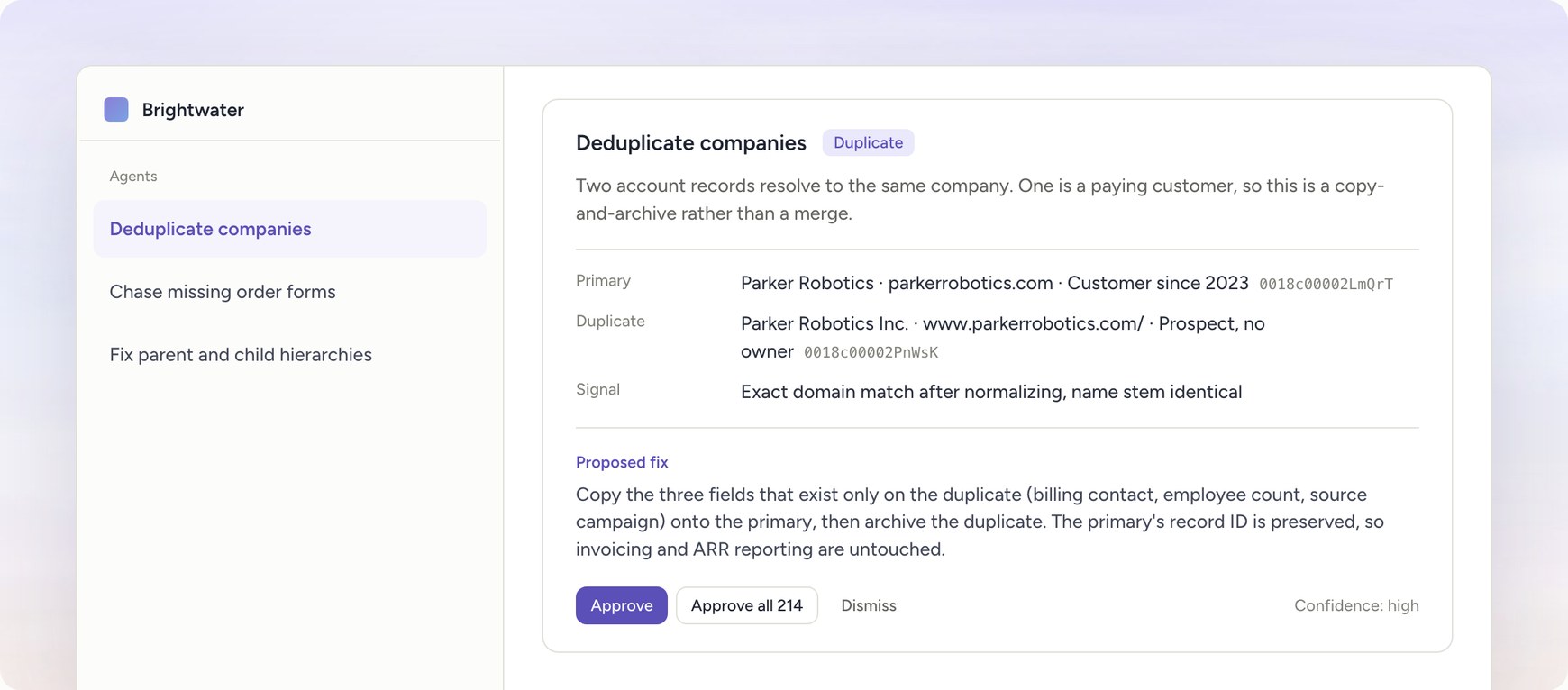
What a proposed fix looks like in Quill. The companies and numbers are illustrative.
Quill also fixes hierarchies, missing fields, and stale pipeline, works with Salesforce, Attio, and other CRMs, matches the same customer across two CRMs or two HubSpot portals, and is SOC 2 Type II and HIPAA compliant. Quill RevOps MCP checks the changes that AI assistants such as Claude or ChatGPT make against your RevOps rules, and Quill Data Capture turns calls, meetings, Slack, and email into CRM updates.
Limits. Quill is a service with a setup step. We start with a free diagnostic of your data, and our team builds and tunes custom agents for the problems we find, so you can't install it from the marketplace and run it in ten minutes. For one batch of duplicates in a small portal, a marketplace app will be faster and cheaper.
Best for. RevOps teams whose duplicates keep coming back, teams with duplicates that email and domain rules can't catch, and companies with more than one CRM.
Pricing. The diagnostic is free. After that, Quill is priced on your data. Get a free diagnostic of your duplicates.
HubSpot Data Hub
What it is. Data Hub, formerly Operations Hub, extends the built-in tool. With Data Hub Professional or Enterprise you can merge duplicates in bulk, see more pairs (up to 30,000 on Professional and 100,000 on Enterprise), and create custom duplicate rules: up to two per object, each comparing up to nine properties.
Strengths. Everything stays inside HubSpot, with no extra vendor or security review. Bulk merge picks the primary record by a criterion you choose: most recent engagement, oldest engagement, created first, created last, or most recently updated. A public beta called Merge Rules lets you write the logic for which record wins a merge, and an audit log shows recently auto-merged records and rejected suggestions.
Limits. Duplicate management still covers contacts and companies only, and custom rules stop at two per object. Bulk merge is an action you run on the pairs HubSpot has found, so it does not stop new duplicates from being created. Merge Rules is still in beta, and the documentation for HubSpot's data agent does not describe finding or merging duplicates.
Best for. HubSpot-only teams that want bulk merge and custom rules from HubSpot itself, especially if they already pay for Data Hub.
Pricing. Data Hub Professional starts at $720 per month billed annually, or $800 billed monthly, with one core seat. Enterprise starts at $2,000 per month. Starter is priced per seat and doesn't include bulk duplicate management.
Insycle
What it is. Insycle is a data management platform for HubSpot, Salesforce, Pipedrive, and several other tools. Merge Duplicates is one of eight modules, alongside Transform Data, Magical Import, Cleanse Data, Bulk Operations, Group and Update, Grid Edit, and Data Validation.
Strengths. Matching is flexible: exact, similar, or fuzzy, on contacts, companies, and deals, with ordered rules for which record is the master and which values to keep. Every bulk operation can be previewed as a CSV before it runs. Templates can run on a schedule or from HubSpot workflows, and the import module compares a file with your existing records before import. Its HubSpot App Marketplace listing shows 7,000 installs and a 4.7 rating.
Limits. You write and maintain the matching rules and templates yourself, and someone on your team has to own them as your data changes. Tickets and custom objects are an add-on. Price is tied to your record count and is recalculated at renewal, so it rises as your database grows.
Best for. Hands-on HubSpot admins who want one toolkit for dedupe, formatting, imports, and bulk updates. See our guide to Insycle alternatives for more.
Pricing. For up to 100,000 records, Starter (one module) is $100 per month billed annually, Growth (two modules) is $150, and Professional (all modules) is $200. Monthly billing costs 25% more. Enterprise is contact sales. There is a 14-day trial.
Koalify
What it is. Koalify is a HubSpot-only deduplication app that runs inside HubSpot. It covers contacts, companies, deals, tickets, and custom objects.
Strengths. You build rules on any combination of properties, including custom properties and name similarity, and choose the logic that picks the primary record. Merging happens from a CRM card on a record or in bulk through HubSpot workflow actions, so you can trigger it on new records. It is rated 4.9 out of 5 on the HubSpot App Marketplace with more than 5,000 installs, and it is SOC 2 Type II and ISO 27001 certified.
Limits. It works only in HubSpot and focuses on duplicates, so it won't fix hierarchies, missing fields, or a second CRM. Matching is rule-based: if two records share no property your rules compare, Koalify won't connect them.
Best for. HubSpot teams that want dependable, low-cost merging that lives in their workflows.
Pricing. Free for portals under 10,000 records. Above that, $5 per 10,000 records per month billed annually, or $10 billed monthly, counting only the objects you choose to deduplicate. The price is capped at $500 per month billed annually.
Dedupely
What it is. Dedupely is a deduplication tool for HubSpot, Salesforce, Pipedrive, Close, Nimble, Google Contacts, and CSV files. In HubSpot it covers contacts, companies, deals, leads, tickets, and custom objects.
Strengths. Setup is quick. You use default searches or build your own with exact, similar, fuzzy, or root domain matching, set field-level merge rules, preview the result, and schedule auto merge. Every plan includes every feature, unlimited merges, and unlimited users, and it works on any HubSpot tier, including Free. It is rated 4.9 out of 5 on the HubSpot App Marketplace.
Limits. Like Koalify, it is rule-based and focused on duplicates. It runs outside HubSpot, so your team works in a separate app.
Best for. Small teams, including those on HubSpot Starter or Free, that want scheduled auto merge for a low monthly price.
Pricing. Starts at $32 per month billed annually, or $40 billed monthly, for up to 30,000 records, with higher tiers by record count. The free trial includes 20 merges.
Dropcontact
What it is. Dropcontact is an email finder and enrichment service that integrates with HubSpot, Salesforce, and Pipedrive. Its CRM integration also detects and merges duplicate contacts and companies in the background.
Strengths. If you are buying enrichment anyway, duplicate merging comes with the same integration. Dropcontact says it finds duplicates even when two records share no common field. It also says it works without a proprietary contact database.
Limits. Deduplication is one feature of an enrichment product, so you get less control over individual merges than in a dedicated dedupe tool. It covers contacts and companies.
Best for. Teams, especially in Europe, that want enrichment and contact deduplication from one vendor.
Pricing. Email finder plans start at €79 per month. The CRM enrichment plan that includes duplicate merging is sold separately and has no public price, so contact sales.
What is the best tool to deduplicate HubSpot?
The best tool depends on why you have duplicates. If they keep coming back from integrations, forms, and imports, or they don't share an email or domain, we recommend Quill CRM Hygiene, because its agents are built and tuned for your portal, run continuously, and match on more signals than property rules. Every change is audit logged and can be undone, and our team handles the setup and upkeep. For a small, one-off cleanup, HubSpot's built-in duplicate tool is enough. Koalify and Dedupely are the best low-cost options for rule-based automatic merging, and Insycle is the better fit when you also want bulk formatting and import tools that your admin configures.
How to choose
- You have one batch of duplicates in a small portal. Use HubSpot's built-in tool. If there are too many pairs to click through, try Koalify's free tier or a Dedupely trial.
- You want rule-based merging at a low price. Koalify runs inside HubSpot workflows. Dedupely also supports other CRMs.
- You want one tool for dedupe, formatting, imports, and bulk updates. Insycle, if you have time to configure it.
- You already pay for Data Hub Professional. Try its bulk merge and custom rules first.
- Your duplicates keep coming back. We work with a RevOps team that ran month-long cleanups with a bulk dedupe tool and still spent 10 to 30 minutes a day merging duplicates by hand. The cleanups worked. Integrations and imports kept creating new duplicates. We built Quill for this case.
- Your duplicates don't share an email or a domain. Rule-based tools need a shared property. Quill's agents don't.
- You load event lists or vendor files. Match rows to existing records before import. Our guide to importing event leads into HubSpot shows how to do it by hand, and Quill can do it for you.
- You have more than one CRM. Single-portal tools can't match across systems. Quill matches customers across HubSpot, Salesforce, Attio, and other CRMs. If the second system is Salesforce, see our comparison of Salesforce deduplication tools.
Frequently asked questions
Does HubSpot have a built-in deduplication tool?
Yes. Every account automatically deduplicates contacts by email and companies by domain on manual creation, forms, and imports. Professional and Enterprise subscriptions add a tool that lists suspected duplicate contacts and companies for you to review and merge.
Can HubSpot merge duplicates automatically?
Only partly. HubSpot detects suspected duplicates automatically, and you merge them pair by pair or with Data Hub's bulk merge. Data Hub Professional and Enterprise accounts can join the Merge Rules public beta, which sets the logic for which record wins a merge. Third-party apps can merge automatically by rule on a schedule or from a workflow.
Why do HubSpot duplicates keep coming back after a cleanup?
Something keeps creating them. Common sources are sync apps and API integrations, since HubSpot doesn't deduplicate API-created companies by domain, imports with no email or domain on some rows, and forms where people use a different email address. A one-time cleanup doesn't change any of those.
Can you unmerge records in HubSpot?
No. HubSpot's documentation says merged records cannot be reverted. Preview every merge, check which record is primary, and take extra care with records tied to billing or other systems.
Do I need Data Hub to deduplicate HubSpot?
No. Built-in duplicate management comes with any Professional or Enterprise hub, and third-party apps work on lower tiers. Data Hub adds bulk merge, more visible pairs, and custom rules.