

The short answer: If your duplicates keep coming back after every cleanup, if you need matching that goes beyond field rules, or if you are combining two Salesforce orgs after an acquisition, we recommend Quill CRM Hygiene. Our team builds its AI agents for your org. They show evidence for every change, log it so it can be undone, and keep running after the first pass. If you want a self-serve tool your admin runs, DemandTools and Plauti suit large, complex orgs, while Cloudingo, DataGroomr, and Insycle cost less to start. Every org should also turn on Salesforce's built-in duplicate rules, which are included with your license.
Prices were checked on each vendor's own site or AppExchange listing on October 7, 2026.
| Tool | Best for | Records covered | Matching | Runs | Pricing (Oct 2026) |
|---|---|---|---|---|---|
| Quill CRM Hygiene | Duplicates that keep returning, cross-org matching | Accounts, contacts, leads, opportunities, and custom objects | AI agents weigh names, domains, addresses, contacts, activity, and web lookups | Continuously | Free diagnostic, then priced on your data |
| Salesforce Duplicate Management | Alerting or blocking at entry | Accounts, person accounts, contacts, and leads; custom objects with limits | Matching rules with exact and fuzzy methods | At entry; duplicate jobs on Performance and Unlimited | Included with Salesforce |
| DemandTools (Validity) | Admins in large orgs who want full control | Any standard or custom object | Scenarios you configure | On demand or scheduled | Contact sales |
| Plauti | Native dedupe with prevention at entry | Standard and custom objects | Scored exact and fuzzy scenarios, cross-object | At entry and in batch | Free up to 10,000 records, then contact sales |
| Cloudingo | Mid-size orgs that want a published annual price | Leads, contacts, and accounts; custom objects on Professional and Enterprise | Filters and rules you configure | On demand, scheduled, or real time | From $2,500/year per org |
| DataGroomr | Teams that want matching without writing rules | Leads, contacts, and accounts; custom objects on Professional and Enterprise | Machine learning plus optional rules | On demand, scheduled, or at entry | From $1,995/year |
| Insycle | Teams that run HubSpot and Salesforce | Leads, contacts, accounts, and opportunities (custom objects as an add-on) | Exact, similar, and fuzzy rules you configure | On a schedule or from Flow | From $100/month billed annually |
| ZoomInfo Operations | Teams that already use ZoomInfo | Not stated on their site | Matching rules you customize | Automatically | Contact sales |
How we compared them
We compared the tools using each vendor's documentation, pricing pages, and marketplace listings as of October 7, 2026, plus what we see in customer CRMs, and we did not run a head-to-head test. We judged each tool on the questions Salesforce admins and RevOps teams ask before they buy:
- Matching beyond exact rules. Can it find "Parker Robotics" and "PARKER ROBOTICS, INC" with different domains, and can it tell when two similar names are separate companies?
- Merge safety. Does it keep the right surviving record and its ID, carry over related records, and let you undo a merge?
- Cross-org. Can it match records across two Salesforce orgs, or Salesforce and another CRM?
- Ongoing prevention. Does it stop new duplicates from integrations, forms, and imports, or only clean what already exists?
- Governance. Is every change recorded in an audit log, can a change be undone, and can you decide which changes need a person's approval?
- Learning or hand-maintained rules. Does the tool learn from your corrections, or does someone on your team rewrite the rules each time it gets a match wrong?
- Price. What it costs and what drives the cost: users, records, or modules.
Governance and upkeep at a glance
| Tool | Undo a change | Audit log of changes | Who maintains the matching logic | Getting started |
|---|---|---|---|---|
| Quill CRM Hygiene | Yes, any change made through Quill | Yes, every agent and human change, with full edit history | The Quill team, and the agents learn from your corrections | Free diagnostic first, then our team builds your agents |
| Salesforce Duplicate Management | No one-step undo. Records deleted by a merge can be undeleted, but related records stay on the surviving record | Not stated on their site | Your admin, in matching rules and duplicate rules | Already in your org |
| DemandTools (Validity) | Yes, undo merge and automatic restore files | Yes, an audit trail of changes | Your admin, in matching scenarios | Through sales |
| Plauti | Yes, restore is included in every plan | Yes, change history and audit are included in every plan | Your admin, in scenarios and thresholds | Self-serve, free up to 10,000 records, with a 14-day trial |
| Cloudingo | Yes on Professional and Enterprise, not on Standard | Merge and convert summary report, plus backup and restore activity reports | Your admin, in filters and rules | Self-serve, with a 10-day trial |
| DataGroomr | Undo on Enterprise. Rollback from a backup is a separate add-on | Yes, a log browser lists merge jobs | Its machine learning models, plus optional rules you write | Self-serve, with a 14-day trial |
| Insycle | No one-click undo. You can partly revert by re-importing "before" values from an Activity Tracker report | Yes, the Activity Tracker logs every operation | You, in templates and Recipes | Self-serve, with a 14-day trial |
| ZoomInfo Operations | Not stated on their site | Not stated on their site | Your team, in matching rules you customize | Through sales |
"Not stated on their site" means we could not find it in the vendor's site, docs, or marketplace listing. It may still exist.
Quill CRM Hygiene
What it is. Quill CRM Hygiene (tryquill.com) is a set of AI agents that find and fix data problems in your CRM. Our team builds the agents for your org, and they keep running after the first cleanup, so they catch new duplicates as integrations, web forms, and list imports create them. Deduplicating accounts, contacts, leads, and opportunities is the most common starting point.
Why teams choose Quill
- It matches beyond field rules. The agents compare names, domains, addresses, shared contacts, activity, and web lookups together, so they find duplicate accounts that share no exact field, match leads to the right account, and place subsidiaries under the right parent in your hierarchy.
- It works across two orgs or two CRMs. In-org tools see one org at a time. When you are combining CRMs after an acquisition, Quill matches the same customer in both systems and keeps the original IDs.
- You set the approval level. Every change, by an agent or a person, goes into an audit log and can be undone through Quill, and you decide whether to approve everything, auto-approve by confidence and record type, or let the agents run on their own.
- It learns from your corrections. We call this self-healing. When you approve, dismiss, or correct a proposal, the agents remember it. Say once that two accounts are separate legal entities and they stop proposing that merge, with no rule for your admin to rewrite.
- Our team builds and runs it. We run a free diagnostic of your org first, then build agents around your objects, fields, and rules and keep them tuned as your data changes.
An example. Take a typical case in Salesforce. Six accounts are subsidiaries of a company you already sell to, but all six sit as top-level accounts with no parent, so nothing rolls up. Quill proposes setting the parent on all six. It leaves a seventh look-alike alone, because that account is a separate legal entity with no ownership link, and it won't attach it unless you say so.
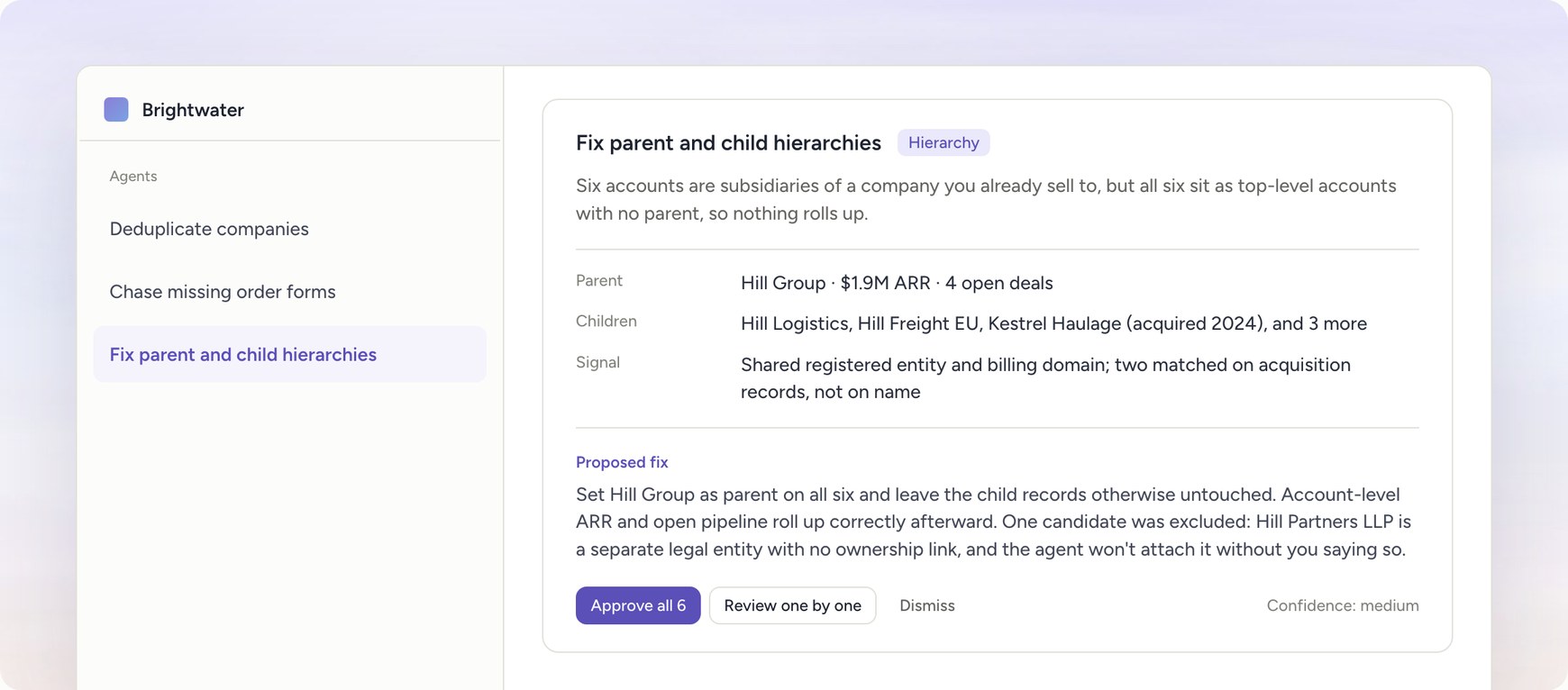
What a proposed fix looks like in Quill. The companies and numbers are illustrative.
Quill also fills missing fields, flags stale pipeline, and reassigns orphaned records, works with Salesforce, HubSpot, Attio, and other CRMs such as Microsoft Dynamics 365, Pipedrive, and Zoho CRM, and is SOC 2 Type II and HIPAA compliant. Quill RevOps MCP checks the changes that AI assistants such as Claude or ChatGPT make against your RevOps rules, and Quill Data Capture turns calls, meetings, Slack, and email into CRM updates.
Limits. Quill is a service built around your data. We start with a free diagnostic and build agents for the problems we find, so you can't install it from AppExchange and run it the same afternoon. For a one-time merge of a few thousand obvious duplicates, a self-serve tool will cost less.
Best for. Teams whose duplicates come back after every cleanup, orgs that need matching beyond field rules, companies merging Salesforce orgs or moving between CRMs, and teams preparing their CRM for AI agents.
Pricing. Quill starts with a free diagnostic and is then priced on your data. Get a free diagnostic to see what we would fix first.
Salesforce Duplicate Management
What it is. Salesforce includes matching rules, which define what counts as a duplicate, and duplicate rules, which decide whether to alert the user or block the save. Both are available in Essentials, Professional, Enterprise, Performance, Unlimited, and Developer Editions. Duplicate jobs, which scan existing accounts, contacts, and leads for duplicates, are available only in Performance and Unlimited Editions.
Strengths. It costs nothing extra and it works where reps create records. Matching rules support exact matching and fuzzy methods such as Jaro-Winkler distance, Metaphone 3, initials, and name variants, so a rule can flag "Margaret Chan" against "Maggie Chan." Standard rules cover business accounts, contacts, leads, and person accounts, and you can write custom matching rules.
Limits. You can use up to five active duplicate rules per object, up to three matching rules in a duplicate rule, and up to five active matching rules per object. A duplicate job runs one matching rule on one object, can fail in an org with many records, and can't be started once completed jobs hold 1,000,000 duplicates. Jobs can run on custom objects, but you can't compare and merge the results. Merging is manual, up to three records at a time. Rules only compare records inside one org, so they can't help you deduplicate accounts across two Salesforce orgs.
Best for. Every org, as a first layer of prevention.
Pricing. Included with your Salesforce license.
DemandTools (Validity)
What it is. DemandTools is a Salesforce data quality product that has been on AppExchange since 2006. It combines duplicate management, data loading, mass updates, email verification, data quality monitoring, and change notifications. Validity also sells DupeBlocker, a separate app that blocks duplicates as records are created, imported, or converted.
Strengths. It deduplicates any object, standard or custom, with matching scenarios you configure and field-level control over merged values. Restore files are generated automatically, merges can be undone, and every change has an audit trail. It holds a 4.7 rating across more than 400 AppExchange reviews.
Limits. Someone has to design and maintain the matching scenarios, and accuracy depends on how well they are tuned to your data. It works on one org at a time, so matching across two orgs means exporting from one and matching that file against the other. Pricing is not public.
Best for. Large orgs with an experienced Salesforce admin who wants a broad toolkit.
Pricing. Validity does not publish pricing. Contact sales.
Plauti
What it is. Plauti, long known for its Duplicate Check app, is a data quality platform that runs natively inside Salesforce and Microsoft Dynamics 365. It finds and merges duplicates, prevents new ones, and verifies data.
Strengths. Because it runs inside Salesforce, your data stays in your org. Matching scenarios combine exact and fuzzy comparisons into a score, with synonym lists that treat "Robert" and "Bob" as the same name. It matches across two object types, such as leads against contacts, and can auto-merge above a score you set while sending the rest to review. It checks for duplicates during manual entry, imports, and API writes. Restore and change history are included in every plan.
Limits. You design the scenarios and thresholds, and they need tuning as your data changes. It works inside one org. Paid pricing is not public.
Best for. Salesforce teams that want a native app with prevention at entry and a free starting point.
Pricing. Free for up to 10,000 records with basic functionality, according to its AppExchange listing. Paid plans are priced on record volume with unlimited users, so contact sales for a quote. There is a 14-day trial.
Cloudingo
What it is. Cloudingo is a dedupe and cleanup tool for Salesforce that you use through its own web app. It also integrates with Marketo.
Strengths. Pricing is public and charged per org, with no fee per Salesforce user. Every plan includes matching from exact to fuzzy, mass merge and convert, scheduled automation jobs, and mass update and delete. The Professional plan adds real-time merge, which merges new duplicates as they arrive, plus undo and restore for merges.
Limits. You configure the filters and rules. Custom objects, undo, and real-time merge are not in the Standard plan. Each license covers one Salesforce org, and plans are annual only.
Best for. Mid-size orgs that want a predictable annual cost and a tool an admin can learn quickly.
Pricing. Standard is $2,500 per year with one user, Professional is $6,000 with three users, and Enterprise is $10,000 with eight users. Orgs with more than 300,000 records pay $100 for every additional 100,000 records. There is a 10-day trial.
DataGroomr
What it is. DataGroomr is a cloud app, listed on AppExchange, that uses machine learning to find duplicates in Salesforce.
Strengths. You can start without writing matching rules, because its models identify likely duplicates for you, and you can add rules later. It covers lead to contact and account matching, duplicate detection at entry, scheduled jobs, and CSV import. Its AppExchange rating is close to 5 out of 5 across more than 100 reviews.
Limits. Custom object and cross-object matching need the Professional plan, and undoing a merge needs Enterprise. Price rises with record count and users. Each subscription connects to one production org.
Best for. Small and mid-size teams that want better than exact matching without building rule sets.
Pricing. Standard is $1,995 per year with 100,000 records and one user, Professional is $3,995 with 200,000 records and two users, and Enterprise is $7,995 with 300,000 records and three users. A Micro plan for orgs under 10,000 records is $399 per year. The 14-day trial is limited to merging 25 records.
Insycle
What it is. Insycle is a data management platform for Salesforce, HubSpot, Pipedrive, and several other tools. Merge Duplicates is one of eight modules for cleaning, formatting, importing, and updating records.
Strengths. It supports exact, similar, and fuzzy matching, lead to contact matching, and ordered rules for the master record and the values to keep. Every bulk operation can be previewed as a CSV before it runs. Templates can run on a schedule or from Salesforce Flow. If you run HubSpot and Salesforce side by side, one tool covers both.
Limits. You write and maintain the matching rules and templates yourself. Custom objects are an add-on. Price is tied to your record count and is recalculated at renewal.
Best for. Teams that work in both HubSpot and Salesforce and want one cleanup tool with clear previews. See our guide to Insycle alternatives for more.
Pricing. For up to 100,000 records, Starter (one module) is $100 per month billed annually, Growth (two modules) is $150, and Professional (all modules) is $200. Monthly billing costs 25% more. Enterprise is contact sales. There is a 14-day trial.
ZoomInfo Operations
What it is. ZoomInfo Operations is the product ZoomInfo built from RingLead, which it acquired in 2021. It deduplicates and normalizes CRM data, enriches records, and routes leads.
Strengths. Dedupe, lead-to-account matching, routing, and enrichment from ZoomInfo's data run in one product.
Limits. Pricing is not public, and it is a broad operations product, which is more than you need if you only want dedupe.
Best for. Teams that already use ZoomInfo and want dedupe and routing from the same vendor.
Pricing. Not published. Contact sales.
What is the best tool to deduplicate Salesforce?
For teams whose duplicates keep returning, who need matching beyond field rules, or who are merging two orgs, we recommend Quill CRM Hygiene, because its agents are built and tuned for your org, match on more signals than field rules, and keep running after the first cleanup. Every change comes with evidence, is audit logged, and can be undone, and our team handles the setup and upkeep. If you want a self-serve tool your admin runs, DemandTools and Plauti fit large orgs, and Cloudingo, DataGroomr, and Insycle fit smaller budgets. In a small org with few integrations, Salesforce's built-in duplicate rules are the right place to start.
How to choose
- Your duplicates come back within weeks of a cleanup. The sources are still running. We built Quill for this case.
- You are merging two Salesforce orgs, or moving between Salesforce and another CRM such as HubSpot, Attio, or Microsoft Dynamics 365. In-org tools see one org at a time. Use Quill for CRM migrations and mergers, or follow our guide to merging Salesforce orgs after an acquisition.
- You need to decide which record and which values survive. Write down your survivorship rules before choosing a tool.
- You have a skilled admin and a large, complex org. DemandTools or Plauti give the most control.
- You want a predictable annual price and a simple tool. Cloudingo.
- You want to avoid writing match rules. DataGroomr.
- You run HubSpot and Salesforce together. Insycle, or Quill if you also need cross-system matching. Our comparison of HubSpot deduplication tools covers the HubSpot side.
- You have a small org with few integrations. Start with Salesforce's built-in duplicate rules and add a tool when they stop being enough.
One pattern we see often: a RevOps team spends a month on a cleanup with a bulk dedupe tool, and between cleanups someone still merges duplicates by hand for 10 to 30 minutes a day. The cleanup worked. The integrations and imports upstream kept creating duplicates.
Frequently asked questions
Does Salesforce have a built-in deduplication tool?
Yes. Salesforce Duplicate Management uses matching rules and duplicate rules to alert or block users when they create a likely duplicate. It is included in Essentials, Professional, Enterprise, Performance, Unlimited, and Developer Editions. Merging is manual, up to three records at a time.
Which Salesforce editions include duplicate jobs?
Duplicate jobs, which scan existing accounts, contacts, and leads, are available only in Performance and Unlimited Editions. Other editions get duplicate rules that run when a record is created or edited.
Can Salesforce duplicate rules match records across two orgs?
No. Matching rules and duplicate rules only compare records inside the same org. To match across orgs, you match outside Salesforce before you load the data. Our guide on deduplicating accounts across two Salesforce orgs walks through the steps.
Why do duplicates keep coming back after a cleanup?
Most duplicates are created by systems, such as marketing automation syncs, web forms, enrichment tools, and list imports that don't check for existing records. Duplicate rules can miss these when the incoming record differs in format from the existing one. The fix is ongoing matching on new records plus changes to the sources.
Is it safe to merge duplicate accounts in bulk?
It can be, if the tool keeps the right surviving record and its ID, moves related records, and lets you undo merges. Be careful with paying customers, accounts linked to billing or ERP IDs, and similar names that are separate legal entities. Review a sample first, and require approval for low-confidence matches.