

The short answer: Survivorship rules decide what a merged record looks like when two records describe the same customer. Make two decisions. First, pick the surviving record, usually the one other systems such as billing already point to, because its ID is what keeps those links intact. Then decide field by field which value wins, using rules like "the system of record for this field wins," "most recently updated wins," or "the non-empty value wins," with a fallback and a person to review conflicts that matter, such as ownership.
These rules come up whenever records merge: cleaning duplicates inside one CRM, consolidating two orgs or portals after an acquisition, or migrating to a new CRM. They are one of the reusable parts of the CRM consolidation playbook for private equity roll-ups, because the rules you settle for one add-on apply to the next.
Record-level and field-level survivorship
There are two ways to decide what survives.
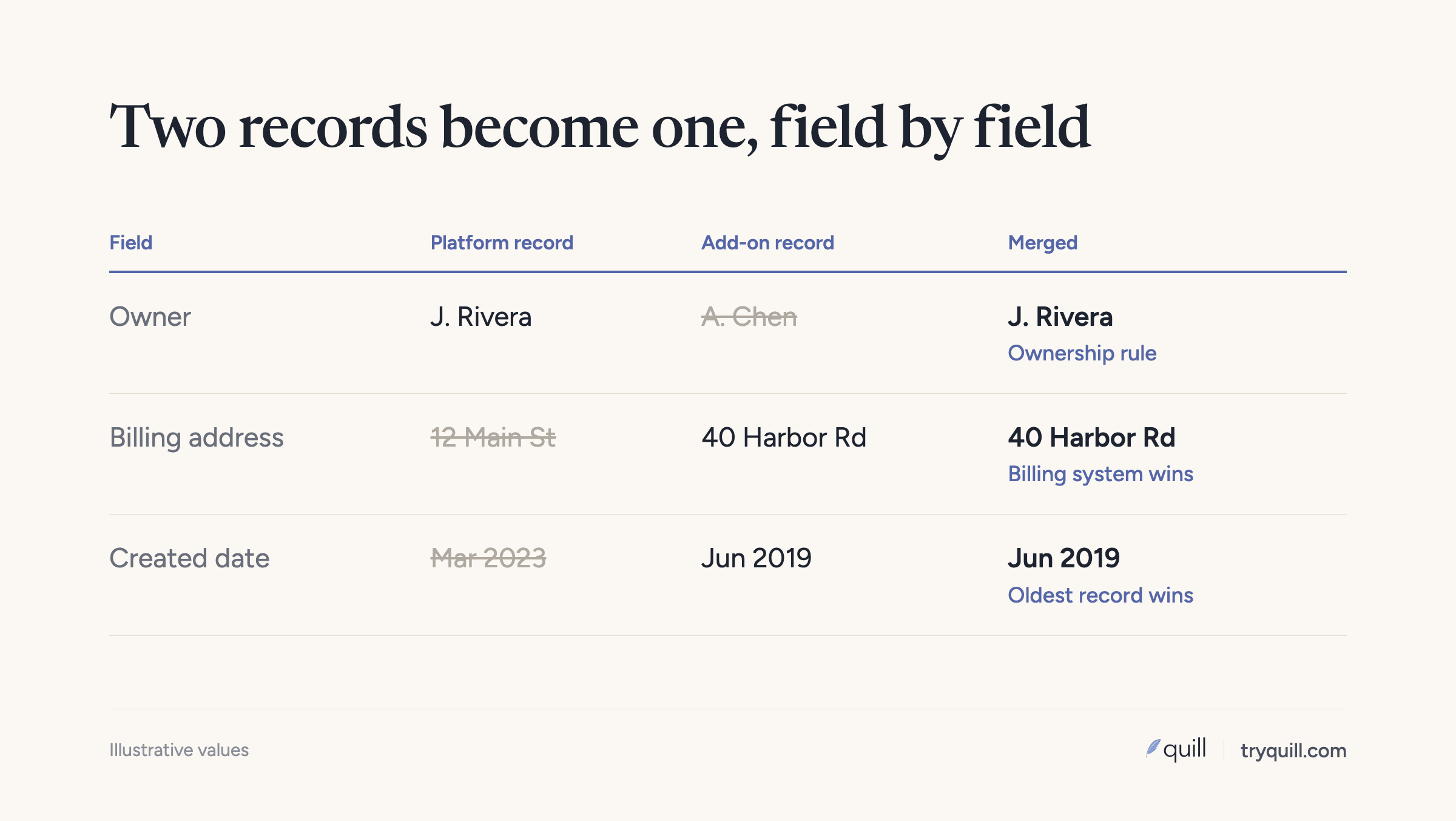
Record-level survivorship picks one whole record as the winner and discards the other. It is simple, and it is how many teams merge by hand. The problem is that the winning record is rarely best on every field. Your record may have the right owner and the acquired company's record the right billing address.
Field-level survivorship picks a winning record for its ID and relationships, then chooses the best value for each field from any of the records being merged. The master data management world calls the result a golden record. This is more work to set up and much more accurate, and it is what you want for any merge that touches customers.
Salesforce's merge screen works this way already. You choose a principal record, then choose which record's value to keep for each field. HubSpot's merge keeps the primary record's values by default, with some exceptions: for companies it combines domains, and it keeps the lifecycle stage that is furthest along. Knowing these defaults matters when you plan rules, because anything you don't set explicitly falls back to them.
Step one: choose the surviving record, and protect its ID
Before any field rules, decide which record's ID survives. Other systems store CRM record IDs: billing, invoicing, the data warehouse, support tools, product analytics, and the finance team's spreadsheets. If the surviving ID changes, every one of those links breaks.
At one of our customers, finance, invoicing, and order-to-cash were all keyed off the CRM record ID once an account became a customer. A merge that produced a new ID would have cut those links, so the team insisted on keeping the original record and moving data onto it.
Check how your CRM behaves:
- Salesforce keeps the principal record's ID. The other records go to the Recycle Bin, and related records such as activities and campaign memberships move to the principal. The merged record keeps the created date and creator of the oldest record.
- HubSpot creates a new record ID for the merged record by default. HubSpot has a beta that preserves the primary record's ID instead. If you can't use it, update the ID in every downstream system after the merge, or move data onto the record finance uses rather than merging.
A good default for which record survives:
- The record another system already references (billing, ERP, product).
- Otherwise, the record in the CRM you are consolidating into.
- Otherwise, the record with the most activity and related records, since moving fewer children means less risk.
Across two CRMs, keep a crosswalk of every source ID to its surviving ID, so anything that stored the old ID can be repointed.
Step two: pick a rule for each field
Common survivorship rules, and when each fits:
| Rule | How it works | Good for |
|---|---|---|
| System of record wins | A named system is trusted for this field | Billing address from the billing system, legal name from the contract |
| Most recent wins | The value updated most recently survives | Phone numbers, titles, fields that change often and are edited by people who know |
| Non-empty wins | Any value beats a blank | Descriptive fields such as industry or LinkedIn URL |
| Most complete record wins | Take values from the record with the fewest gaps | A fallback when nothing else decides |
| Combine | Keep both values | Domains, email addresses, notes, tags |
| Rule by condition | Different rule depending on context | Owner, which depends on customer status and territory |
| Send to a person | Conflicts go to review | Ownership, status, anything tied to compensation or revenue |
Most fields need a main rule and a fallback. For example: "Industry: take the value from the enrichment provider; if blank, take the most recently updated non-empty value."
Be careful with "most recent wins" on its own. An integration or bulk update can touch thousands of records at once and make stale values look new. Check which user or integration last changed the field before trusting recency.
Suggested rules for common account fields
| Field | Suggested rule |
|---|---|
| Account name | Legal name from billing or contract if the account is a customer; otherwise the most common form, reviewed |
| Website and domains | Keep the primary domain from the surviving record; store every other domain as an alias |
| Billing address | System of record (billing or ERP) wins |
| Industry, employee count | One trusted source (enrichment or your own classification), applied to both sides |
| Owner | Rule by condition, agreed with sales leadership; conflicts go to a person |
| Customer status, lifecycle stage | Furthest-along active status wins, checked against billing |
| Parent account | Keep the link that matches your verified hierarchy, not whichever record had one |
| Created date | The oldest record's date, so tenure and cohort reports stay right |
| Revenue and contract fields | System of record wins; never sum or pick by recency |
| Notes and descriptions | Combine, with the source labeled |
Ownership needs its own rule
Ownership decides who gets paid, who calls the customer, and which territory the account counts toward. It is the field most likely to cause a fight after a merge, and the one most likely to come out wrong if left to defaults. In one cleanup we ran, merged records often ended up owned by whoever owned the primary record, even when a different, active rep was working the account.
Write the ownership rule with sales leadership before merging anything. A typical version: the current owner of an active opportunity keeps the account; otherwise the owner of the customer record keeps it; otherwise the territory rule assigns it; inactive owners never survive. Send anything the rule can't settle to the sales leaders who agreed to it.
When two records should stay separate
Survivorship assumes two records are the same thing. Sometimes they look alike and aren't, and merging them loses information. Rules should say when not to merge:
- Former and returning customers. One of our customers keeps a former customer and a returning customer as separate records, so historical churn and reactivation stay correct in reporting. Link them rather than merging.
- A contact who changed companies. The same person at two employers is two contacts. Each record's activity belongs to a different account.
- Parents and subsidiaries. Two entities under one parent should be linked in a hierarchy, not merged into one account.
- Same-name companies. Two businesses with the same common name are different customers. Record the decision so nobody merges them later.
How to write and apply survivorship rules
1. List the fields that matter
Start with fields used in reporting, routing, compensation, and integrations. You don't need a rule for every field on the account, but you do need one for each field that decides how the business runs, which is usually a few dozen.
2. Name a system of record for each
For each field, decide which system is trusted, if any. This is often the most useful conversation in the whole exercise, because it exposes fields that two teams each assumed they owned.
3. Pick a rule and a fallback
Use the table above. Write each as one sentence someone outside RevOps can check.
4. Save the losing values
Before the merge, copy any losing value you might need into a legacy field or a note on the surviving record. In Salesforce, field values you don't select are gone after the merge, and HubSpot merges can't be undone.
5. Test on a sample and review the output
Run the rules on a few hundred merges, including hard cases, and have the people who own those accounts check the results. Adjust, then run the rest in batches.
6. Document the rules and reuse them
Keep the rules in one place with an owner. When the next acquisition arrives, you start from them instead of from scratch. The mechanics differ by platform; see how to deduplicate accounts across two Salesforce orgs and how to merge two HubSpot portals after an acquisition.
How Quill helps
Quill's agents apply your survivorship rules when they merge records, within one CRM or across two. You set which record survives and which value wins for each field, and each proposed merge shows the resulting record, the evidence that the records match, and where each value came from before anything is written. Conflicts you've marked for review, like ownership, go to a person. The rules you settle on one merger carry over to the next, which matters most for private equity platforms that integrate add-on after add-on. See Quill for private equity. For a single merger, see CRM Migration or Merger and CRM Hygiene, or book 15 minutes.
Frequently asked questions
What are survivorship rules?
Survivorship rules decide which record and which field values survive when duplicate records are merged. They name the surviving record, usually to protect its ID, and set a rule for each field, such as "system of record wins" or "most recent non-empty value wins." The result is one record with the best available value for every field.
Which record should survive a merge?
Usually the record that other systems already reference, such as billing or the data warehouse, because keeping its ID keeps those links intact. If no other system references either record, keep the one in the CRM you're consolidating into, or the one with the most activity and related records.
Does merging in HubSpot change the record ID?
By default, yes. HubSpot creates a new record ID for the merged record, although a beta can preserve the primary record's ID. Salesforce keeps the ID of the principal record you choose. Check this before merging any record that other systems point to.
Is "most recent value wins" a good rule?
It works for fields people update when they learn something new, like phone numbers and titles. It is risky on its own, because integrations and bulk updates can make old values look recent. Check who last changed the field, and use a trusted source instead for fields like billing address or revenue.
Who should decide account ownership after a merge?
Sales leadership, before any records merge. Write the rule down (for example, the owner of an active opportunity keeps the account, inactive owners never survive), apply it consistently, and send conflicts the rule can't settle to the leaders who agreed to it.