

The short answer: To consolidate CRMs across a private equity roll-up, pick the platform's CRM as the system every add-on moves into, agree on one set of pipeline stages and field definitions, and then do the data work for each add-on: profile both CRMs, match the customers that exist in both, decide which values win when they disagree, rebuild account hierarchies, and move the rest in waves. Most of the time goes into matching and cleaning, not moving. Platforms that write that work down as a repeatable playbook get faster with every add-on.
The rest of this post walks through each step, what tends to go wrong, and how to set it up so the fifth add-on takes a fraction of the time the first one did.
Why the CRM is the part of add-on integration that stalls
Every add-on comes with its own CRM. Sometimes it is Salesforce, sometimes HubSpot, sometimes a spreadsheet and an inbox. After a few deals, a platform company is running several CRMs at once, each with its own stages, its own owners, and its own idea of what a customer is.
That creates three problems for the platform and the fund.
First, nobody can answer simple questions across the group. How much pipeline do we have? Which companies are ahead of plan? What is our win rate? Each company defines a qualified opportunity differently, so the numbers can't be added together, and someone ends up rebuilding the board deck by hand every quarter.
Second, the cross-sell thesis depends on data nobody has. Many add-ons are bought partly because the platform can sell into the acquired company's customers, and the other way around. To do that, you need to know which customers you already share, which ones are new to you, and who owns each relationship. That list lives across two or more CRMs that don't agree on names.
Third, the data itself is usually in worse shape than anyone expected. A small company's CRM tends to have duplicate accounts, contacts who left years ago, deals that were never closed out, and owners who no longer work there. Moving that data into the platform's CRM moves every one of those problems with it, which is why the add-on's data should be cleaned before the migration, not after.
Decide the end state before you touch the data
Before any records move, decide what the combined system should look like. There are three common choices.
| Approach | When it fits |
|---|---|
| Full consolidation into the platform's CRM | The add-on sells to the same buyers, the sales teams will merge, or the cross-sell plan depends on one view of the customer. |
| Separate CRMs with a shared reporting layer | The add-on runs as its own business, sells to different buyers, or will be sold separately. |
| Consolidate some teams now, others later | The add-on has a large installed base or heavy customization, and a full move would disrupt selling this quarter. |
Most platforms end up consolidating, because the reasons to buy the add-on (shared customers, a combined sales team, one number for the board) all depend on it. If you keep CRMs separate, you still need the matching work below, because the reporting layer has to know which accounts are the same customer.
Whichever you pick, agree on the definitions first. Write down the pipeline stages and what has to be true for a deal to enter each one, the account types, the lead sources, the regions and segments, and who owns what. If these aren't settled before the move, every add-on keeps its old meaning under the new labels, and the combined pipeline report looks right but isn't.
The data work, step by step
This is the part most integration plans cover in a single line. It is also where most of the time goes.
1. Profile both CRMs before you move anything
Start by measuring what you have in each system. Count accounts, contacts, open opportunities, and activities. Find the duplicates inside each CRM, the share of records missing key fields like domain, industry, or owner, the records owned by inactive users, and the open deals with close dates in the past.
This gives you two things. You get a realistic scope and timeline instead of a guess. You also get a list of what to clean in the add-on's CRM before it moves, which is far cheaper than cleaning it afterward inside the platform's system.
2. Match the customers that exist in both CRMs
This is the hardest step and the most important one. The same company almost never looks the same in two CRMs. One team has "IBM", the other has "International Business Machines Corp." One uses the parent company's domain, the other uses a regional one. One account is the legal entity, the other is a brand or a subsidiary.
Exact matching on name or domain catches the easy cases and misses the rest. A good match looks at the company name after cleaning up suffixes like Inc. and LLC, the website domain and email domains of the contacts, the billing address, the people on the account, and recent activity. Where the CRM data isn't enough, look the company up to confirm whether two records are the same business, a parent and a subsidiary, or two unrelated companies with similar names.
The built-in duplicate tools in Salesforce and HubSpot only look inside one org or portal, so they can't do this step on their own. You need something that can read both systems at once.
Every proposed match should come with the reason for it, and a person should approve the uncertain ones. Merging two different customers is much harder to undo than leaving a duplicate in place for a week. For the step-by-step version on Salesforce, see how to merge two Salesforce orgs after an acquisition and how to deduplicate accounts across two Salesforce orgs. If both companies run HubSpot, see how to merge two HubSpot portals after an acquisition.
3. Decide which values win when records disagree
Once you know two records are the same customer, you still have to decide what the merged record says. The two versions will disagree on the account owner, the industry, the employee count, the address, and the status.
Write these decisions down as survivorship rules, field by field. Common rules are to keep the most recently updated value, keep the value from the system of record for that field (for example, billing address from the platform's ERP), keep the non-empty value, or send the conflict to a person. Ownership usually needs its own rule, agreed with sales leadership before the merge, because it decides who gets credit for the account. Survivorship rules: which record wins in a CRM merge covers how to write them.
4. Rebuild account hierarchies
Roll-ups are especially prone to broken hierarchies. The platform may sell to a parent company while the add-on sells to three of its subsidiaries, each set up as a separate account with no link between them. After the merge you want one parent with its children underneath, so you can see the whole relationship, route it to the right owner, and report on it correctly.
Link parents and subsidiaries during the merge, not after. Once reps start working the combined accounts, fixing hierarchies means changing records they are actively using.
5. Standardize stages, picklists, and owners
Map every value in the add-on's CRM to the platform's definitions: pipeline stages, lead sources, industries, regions, account types, and close reasons. Where the add-on has a value that has no equivalent, decide whether to add it to the platform's list or fold it into an existing one. Reassign records owned by people who have left, and make sure every open deal has an active owner on the day you switch over.
This step is what makes pipeline comparable across companies. Without it, a deal at "Proposal" in one company and "Proposal" in another mean different things, and the combined forecast is wrong from day one.
6. Decide what history to bring
Not everything in the add-on's CRM needs to move. Old closed-lost deals, leads with no activity in years, and contacts with bounced emails add noise and cost. Agree on a cutoff, archive the rest somewhere you can reach it, and move only what the combined team will use. Keep activity history on active accounts, because reps need the context.
7. Move in waves and check each one
Move reference data first, then accounts, then contacts, then opportunities, then activities, so every record has something to attach to when it lands. After each wave, check that record counts match, relationships survived (contacts on the right accounts, deals linked to their contacts), and no new duplicates appeared.
8. Keep the combined CRM clean after cutover
The first few weeks after the switch are when a merged CRM degrades fastest. Reps from the add-on create new accounts for customers that already exist, two owners claim the same account, and integrations built for the old system write data in the old format. Run the same duplicate, ownership, and hierarchy checks every day for the first month, then keep them running. The next add-on will land in this system, and it is much easier to merge into a clean CRM than a messy one.
Turn the steps into a playbook for every add-on
For a single acquisition, the steps above are a project. For a platform doing several add-ons, they should be a playbook that gets faster with every deal.
What makes the playbook reusable:
- One data model and one set of definitions for stages, account types, segments, and ownership, written down and owned by someone at the platform.
- Matching and survivorship rules that carry over. The rules you settled in the first add-on (which system wins for billing address, how to treat subsidiaries, how to handle ownership conflicts) apply to the next one.
- A standard integration checklist with owners and dates for each step above.
- A clean platform CRM. Every add-on merges into the platform's system, so any mess in it gets multiplied with each deal. Keeping it clean between deals is part of integration work, not separate from it.
With this in place, the operating partner gets a combined pipeline they can trust, broken out by company, stage, and segment, without anyone rebuilding it by hand each quarter.
Use the overlap list for cross-sell
The matching step produces something the deal team wants badly: the list of customers the platform and the add-on already share, and the customers each one has that the other doesn't. That list is the starting point for the cross-sell plan in the investment case.
Pull it out as its own report. For shared customers, decide who owns the relationship and whether there is an upsell. For customers only one side has, hand them to the right team with the context from the other CRM. Measure cross-sell pipeline against that list so the board can see whether the thesis is working. How to find shared customers after an acquisition walks through building that list.
Look at the CRM during diligence
The best time to learn how much work an add-on's CRM will take is before the deal closes. During diligence, work out with deal counsel what CRM data you can review, then check a few things: how many accounts are duplicates, how many open deals have close dates in the past, how many records are owned by people who have left, how complete the key fields are, and how the pipeline stages are defined. The answers tell you how far to trust the pipeline you are buying, and how long integration will take. The full list is in what to check in a target company's CRM during due diligence.
A 100-day plan for one add-on
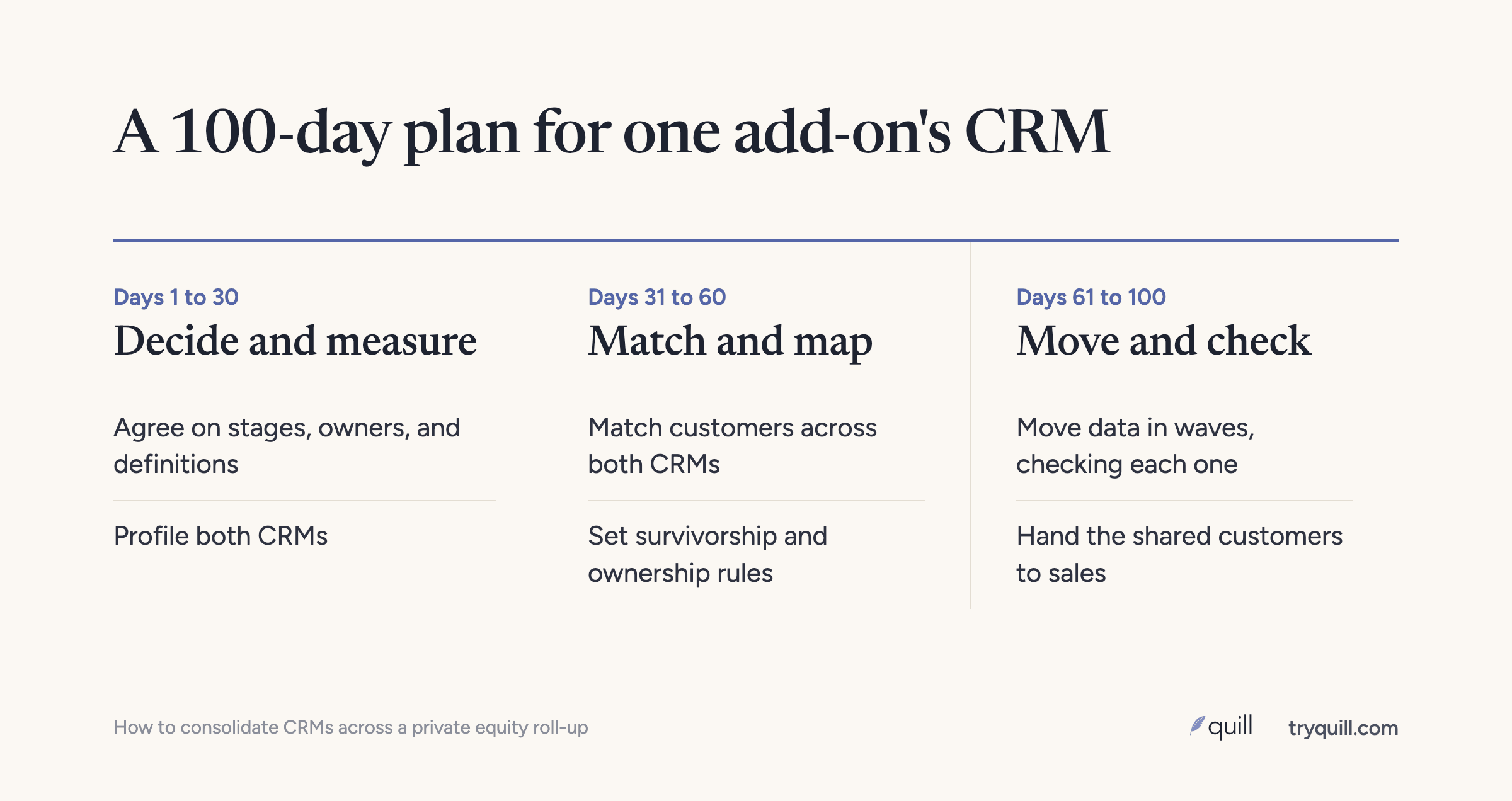
Days 1 to 30: agree on the end state and the definitions. Profile both CRMs. Start cleaning the add-on's data where it sits.
Days 31 to 60: match customers across both systems, approve the uncertain matches, settle survivorship rules and ownership, and rebuild hierarchies. Map stages and picklists.
Days 61 to 100: move data in waves, check each wave, switch the add-on's team over, and run daily checks on the combined CRM. Hand the overlap list to the sales leaders.
Larger add-ons, heavy customization, or very messy data will stretch this. Doing the matching and cleaning before the move is what keeps it from stretching further.
How Quill helps
Quill builds AI agents that keep the data in systems of record accurate, starting with the CRM. For CRM migrations and mergers, our agents profile both CRMs, find duplicates within and across Salesforce orgs and HubSpot portals, match the same customer across systems, rebuild account hierarchies, and apply your survivorship rules. Every proposed merge comes with the evidence behind it, and nothing is written until a person approves it.
After cutover, the same agents keep the combined CRM clean with CRM Hygiene, so it is ready for the next add-on. If you are running a buy-and-build strategy, see Quill for private equity, or book 15 minutes and tell us what your next integration looks like.
Frequently asked questions
How long does it take to integrate an add-on's CRM?
For a straightforward add-on moving into the platform's CRM, plan on about three months from close to a clean, combined system. Heavy customization, several CRMs, or very messy data can add months. Most of the time goes into matching customers and cleaning data, not moving records, so starting that work during diligence or right after close shortens the timeline the most.
Should every portfolio company use the same CRM?
Not always. Consolidating into one CRM makes sense when add-ons sell to the same buyers, will share a sales team, or are part of a cross-sell plan. When an add-on runs as its own business or may be sold separately, a separate CRM with a shared reporting layer can be the better choice. Either way, the companies need shared definitions and matched customer records for the combined reporting to be accurate.
What if the add-on uses a different CRM from the platform?
Treat it as a migration into the platform's CRM rather than a merge of two similar systems. Map the add-on's objects, fields, and stages to the platform's model, clean and deduplicate its data where it sits, and then match its customers against the platform's before you load anything. Our guides on merging two Salesforce orgs, merging two HubSpot portals, and cleaning CRM data before a migration cover the steps for each case.
How do you get consolidated pipeline reporting across portfolio companies?
Every company has to use the same pipeline stages with the same entry criteria, the same segment and region definitions, and matched customer records, whether they share one CRM or report into a shared layer. Without shared definitions, the numbers add up but don't mean the same thing. Once definitions are aligned, the combined report can come straight from the CRM instead of being rebuilt by hand each quarter.
What CRM data should you review in due diligence?
Look at duplicate rates, open deals with past close dates, records owned by people who have left, how complete key fields are, and how the pipeline stages are defined. These tell you how reliable the reported pipeline is and how much work integration will take.