

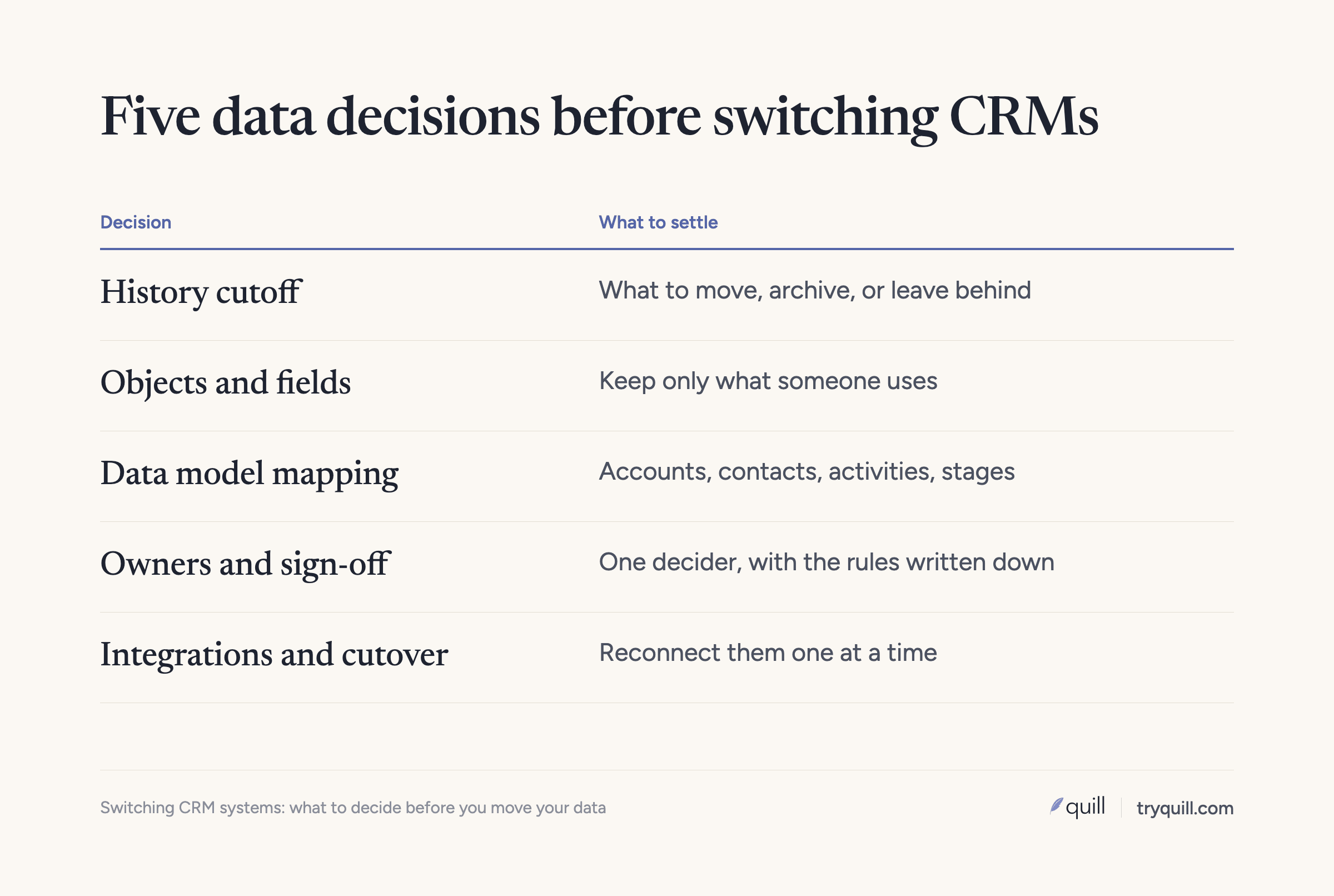
The short answer: When you are switching CRM systems, the decisions that shape the project are about data, and they should be made before anyone maps a field. Decide how much history to bring, which objects and custom fields to keep, how the old data model translates to the new one, who owns the data and approves the rules, which integrations will write into the new CRM, and how long both systems will run. Then clean the data you decided to keep, because a switch moves every duplicate and stale record along with the good ones.
This post is for the RevOps or operations leader whose company has decided to change CRM, or is about to. It covers the decisions, not the vendor choice. For the cleanup itself, see our checklist on how to clean your CRM data before a migration.
Why the data decisions come first
Most CRM switches are planned around the new system: licenses, page layouts, automation, and training. The data gets one line on the project plan, and that line ends up driving the timeline. Every record you move has to be mapped, cleaned, matched against anything already in the new CRM, loaded in order, and checked. If you make the data decisions early, the migration gets smaller. If you make them late, your implementation partner builds the new CRM around the old data, including the parts nobody uses.
How much history should you bring to the new CRM?
You have three options, and most teams end up using all of them for different parts of the data.
- Move it. Active accounts and contacts, open deals, and the activity history reps need on accounts they still work.
- Archive it where you can still reach it. Long-closed deals and old activity on inactive accounts. A data warehouse, exports, or a read-only copy of the old CRM all work, as long as someone can find a record when a customer or an auditor asks.
- Leave it behind. Leads with no activity in years, bounced contacts, test records, and records created by integrations nobody remembers.
Set the cutoff with a rule people can apply without debate. For example: move every account with an open deal, a closed-won deal, or any logged activity in the last two years, plus every contact at those accounts with a valid email. Everything else goes to the archive. Agree on the rule before mapping starts, since the rule decides how many records you have to clean.
Finance usually needs closed-won history for revenue reporting and renewals, so keep every customer account and closed-won deal regardless of age. Carry over opt-out status for every contact who has unsubscribed, even if you archive the rest of the record.
Keep the original dates. The new CRM will set its own created date when each record is loaded. HubSpot, for example, treats the create date as a read-only property, so you need a custom field such as "Original created date" on each object and reports that use it.
Which objects and custom fields should you keep?
Start with an inventory of the old CRM: every object, every custom field, how many records have a value in each field, and when each was last updated. Most older CRMs have a long tail of fields that are empty, duplicated, or left over from a project that ended.
For each field, decide one of four things:
- Map it to a standard field in the new CRM.
- Recreate it as a custom field, with a clear definition and an owner.
- Merge it with another field that captures the same thing.
- Drop it, and keep the values in the archive.
Keep a field when someone uses it in a report, a workflow, a routing rule, or a decision, and drop fields that are mostly empty or that nobody can explain. Do the same for picklist values, since old values make mapping harder and can block merges later.
Custom objects need a separate look. Check what each one holds and whether the new CRM has a standard object that fits. Also check your plan level. In HubSpot, custom objects require an Enterprise subscription, so a model that depends on them affects which edition you buy.
What data model differences should you plan for?
CRMs describe customers in different ways, and the differences decide how records have to be reshaped during the move. These are the ones that cause the most rework. Our guides for Salesforce to HubSpot, HubSpot to Salesforce, and Dynamics 365 to Salesforce cover the details for each path.
How accounts and contacts relate
In Salesforce, every contact is normally tied to one primary account, and a contact can have indirect relationships with other accounts. In HubSpot, a contact can be associated with several companies, and one of them is the primary company. Logged emails, for example, attach automatically only to the primary company. In Microsoft Dynamics 365, a contact's parent customer can be an account or another contact.
When you move between models, decide which relationship becomes the primary one, and what happens to contacts with no company at all. If you sell to individuals as well as businesses, Salesforce offers person accounts, which combine account and contact fields into one record. Person accounts are generally treated as permanent once enabled, so test that decision in a sandbox before you load anything.
How leads, contacts, and lifecycle stages map
Some CRMs separate leads from contacts, and others track a person through lifecycle stages on one record. Write down, for each stage in the old system, whether those records become leads, contacts, or a stage value in the new one.
Where activities live
Calls, emails, meetings, notes, and tasks are usually the largest part of the data by volume, and each CRM stores them differently. Decide which activity types move, how far back, and which records they attach to, since an email logged against three companies in one system may need to attach to one account in the next.
How deal stages and pipelines line up
Map every stage in every pipeline to a stage in the new CRM, and keep the original stage in a field on each deal so historical reports still make sense. If the two systems define a stage differently, such as when a deal counts as qualified, write the new definition down before the move and tell the sales team.
Design the new model for where the business is going. One RevOps lead we work with had built their CRM around a single product, and when the company added more products they had to rework properties and reporting across the system. A switch is the cheapest time to plan for that.
Who owns the data and signs off on the rules?
A CRM switch needs one person who can make data decisions and make them stick, usually the head of RevOps or business systems. Without that person, the implementation partner ends up making the calls by default.
Then name owners by area: sales leadership for stages and account ownership, finance for revenue, billing IDs, and closed-won history, marketing for leads and consent, and customer success for support and renewal data.
Write the rules down in one place:
- The history cutoff and archive location.
- The field and picklist mapping.
- How duplicates are identified, and which record and which values win when two records match. Our post on survivorship rules covers how to set these.
- Who owns accounts whose owner has left the company.
- What counts as a successful load, such as record counts, required fields, and links between records.
Get each owner to sign off on their part before the first test load. Changing a rule after a full load usually means reloading.
If the data includes consent status, personal data about individuals, or records covered by customer contracts, involve whoever owns privacy and contracts at your company in the cutoff and archive decisions. This is general information, not legal advice; check with your counsel.
Which integrations will write into the new CRM?
List every tool that reads from or writes to the old CRM: marketing automation, enrichment, sales engagement, call recording, lead routing, billing, support, the data warehouse, and any scripts or AI tools with API access. For each one, decide whether it connects to the new CRM, which objects it may create or update, and how it finds existing records.
Integrations are a common source of duplicates in a new CRM, because each one starts matching against records it has never seen. In HubSpot, for example, companies created through the API or by third-party sync apps are not deduplicated by domain.
Reconnect integrations one at a time after the core load, not all on cutover day. Check each one's matching settings, turn off automatic record creation where you can, and watch what it creates for the first few days.
Also plan for IDs. Record IDs change in a new CRM, so keep each old ID in an external ID field. In Salesforce, Data Loader can upsert on an external ID field and link related records by their external IDs, which keeps relationships intact and gives billing and the warehouse a crosswalk.
How long should you run both CRMs?
As short a time as you can. Every day both systems accept edits, the data drifts apart, and someone has to decide which version is right.
A common plan is to load in stages while the old CRM stays in use, then freeze it on cutover day. Take a final load of anything that changed since the last one, point every integration at the new CRM, and make the old one read-only. Keep it read-only until you have closed at least one reporting period in the new CRM and finance has reconciled it, then move what is left to the archive and retire it.
What are the risks of switching CRM systems with dirty data?
The first risk is the timeline. Duplicates, missing owners, and mismatched picklists surface during test loads, and each round of fixes pushes the go-live date. The second is trust. If reps open the new CRM and find duplicate accounts, deals without contacts, and owners who left the company, they go back to spreadsheets. The third is that the mess comes back, because the habits and integrations that made the old CRM messy keep running in the new one. Plan checks for the weeks after cutover as part of the project. Our post on what to check after a CRM migration lists them.
How Quill helps
Quill's agents clean, dedupe, and match records before, during, and after a CRM migration. Before the move, they profile the old CRM and show you how much of the data is worth moving, which often makes the migration smaller. During it, they match the same customers across systems, including against anything already in the new CRM, and apply your survivorship rules. After go-live, they check that every record, owner, and link arrived and keep catching new duplicates as integrations reconnect. Every proposed change comes with its evidence, and a person approves it before anything is written. See CRM Migration or Merger or book 15 minutes.
Frequently asked questions
What should you decide before switching CRM systems?
Decide how much history to move, which objects and custom fields to keep, how the old data model maps to the new one, who owns and signs off on the data rules, which integrations will write into the new CRM, and how long both systems will run. These decisions set the size of the migration, so make them before field mapping starts.
Should we migrate all of our CRM data when we switch CRMs?
Usually not. Move active accounts and contacts, open deals, closed-won history, and the activity reps need on accounts they still work. Archive older closed deals and inactive records where you can still reach them, and leave behind dead leads, bounced contacts, and test data.
How long does it take to migrate CRM data?
It depends mostly on how much cleanup and matching the data needs, not on the number of records. A small, clean CRM can move in a few weeks, while an enterprise CRM migration with years of duplicates, custom objects, and many integrations takes longer.
Who should own the data decisions in a CRM switch?
One person who can make data decisions and make them stick, usually the head of RevOps or business systems. Under them, sales leadership owns stages and account ownership, finance owns revenue and billing IDs, marketing owns leads and consent, and customer success owns renewal data. Each owner signs off on their rules before the first test load.
Should we run the old and new CRM at the same time?
Only briefly, and with the old one read-only after cutover. Letting both systems accept edits makes the data drift apart. Keep the old CRM available for reference until you have closed a reporting period in the new one, then archive it.